One-time payment
Single
$4.901 export
For one urgent export.
- 1 PDF export
- No fitforpdf watermark
- Branding & layout controls
- Never expires
Secure checkout via Stripe · One-time, never auto-charged

No LLM · Source files not stored · EU-hosted
For consultants sending CRM exports and reporting tables to clients.
Turn wide Excel or CSV tables into readable PDF sections, with key columns repeated.

Typical sources: Excel exports · CSV datasets · SaaS reports
See the same table before and after conversion
Explore how your table is automatically structured
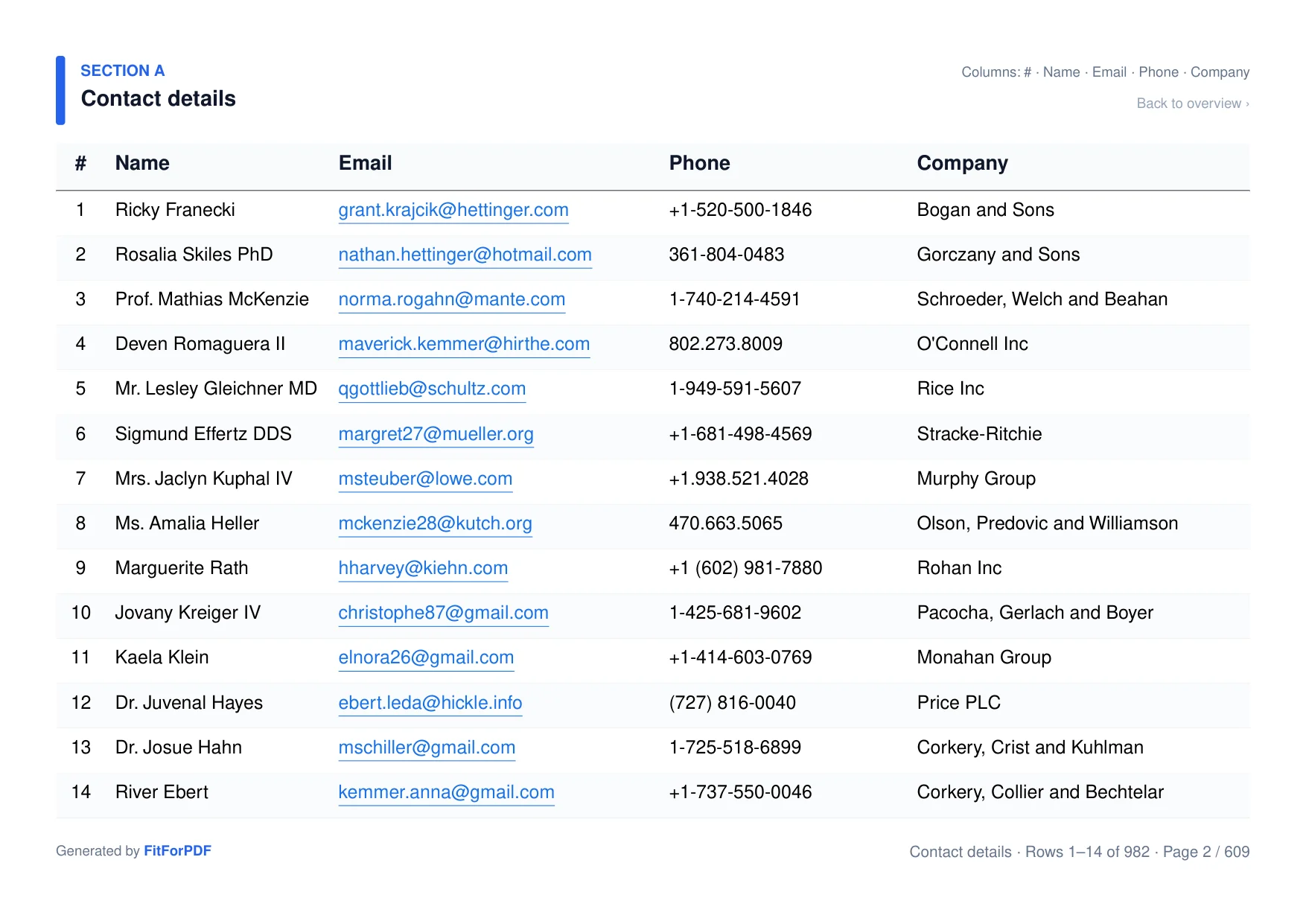
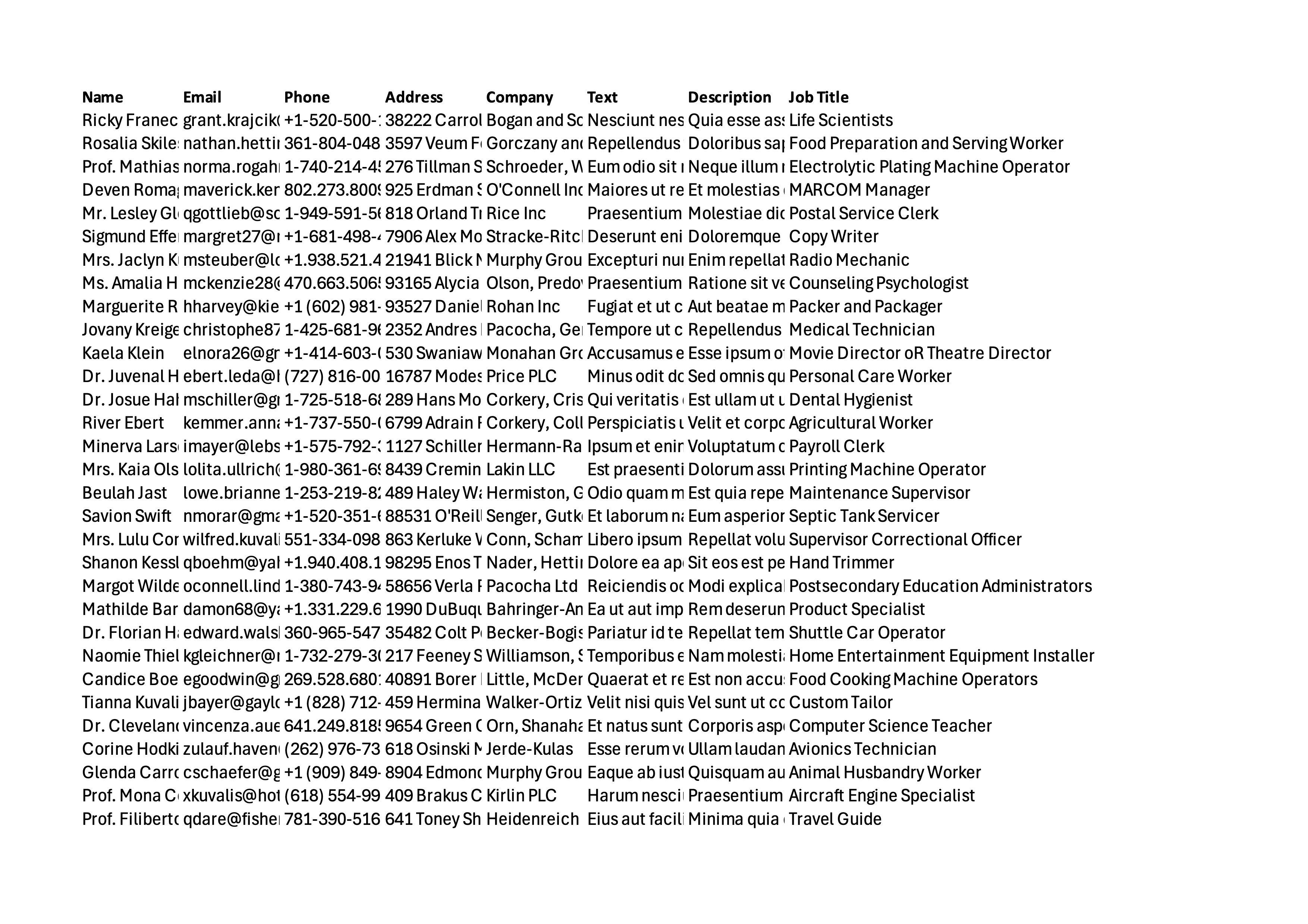
9 columns. Automatically split into 5 readable sections.
Drag to compare
Excel gives you control over print areas, scaling and repeated headings. fitforpdf creates a new layout for wide tables: readable sections, repeated key columns and an overview to navigate the document.
Wide columns
Layout
Page breaks
Reference columns
Overview
Result
| Feature | Excel PDF Export | fitforpdf |
|---|---|---|
| Wide columns | xScaling and print-area controls | ✓Grouped into sections |
| Layout | xPreserves worksheet layout | ✓Creates a new table layout |
| Page breaks | xConfigurable print settings | ✓Automatic pagination |
| Reference columns | xConfigurable print titles | ✓Repeated automatically |
| Overview | xCan be built in the workbook | ✓Generated section overview |
| Result | xPrinted worksheet | ✓Sectioned document for reading |
No subscription. Credits never expire.
One-time payment
For one urgent export.
Secure checkout via Stripe · One-time, never auto-charged
One-time payment
$1.90 per export
For freelancers and regular client work.
Secure checkout via Stripe · One-time, never auto-charged
Pro subscription
Secure checkout via Stripe · Cancel anytime · Receipt & invoice included
Building a product? API plans from $15/mo · Teams & high volume? Contact us.
Just want to test the waters?
3 free exports. fitforpdf watermark included. No account needed.
Upload a file for free →Have a promo code?
Early workflow feedback
“The export often isn't truly client-ready, so there's usually a manual cleanup step before I can send it out.”
Magdalena, spreadsheet/accounting workflow feedback
Cut-off columns, awkward page breaks, and layout shifts were the recurring pain.
That depends on your file and current workflow. Try the same export in Excel and FitForPDF, then compare the time and readability. We have not measured an average customer time saving yet.
Try your own file free first. If the result fits your needs, a single export without the watermark costs $4.90, with no subscription.
Excel can set print areas, scale pages and repeat headings. FitForPDF offers another approach for wide tables: split columns into readable sections and repeat key columns automatically.
Use a table with a clear header row. FitForPDF creates a new layout from the data; charts, merged cells and the original workbook formatting are not reproduced.
Excel and CSV files.
Both. Use the app for quick fixes, the API for automation.
Yes — watch it fix a real sample spreadsheet live, no upload needed. Open →
No. Files are deleted immediately after conversion. The generated PDF is available for up to 15 minutes.
Upload your Excel or CSV and get a PDF that is structured, readable, and ready to send.
